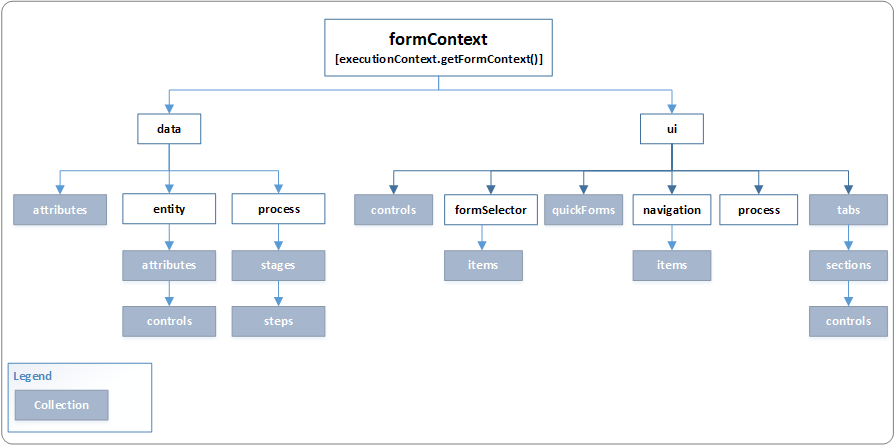
CRM versions and release dates
CRM 2011-February 2011
crm2013-November 2013
crm2015-Jan 6, 2015
CRM 2016 Nov 2015
Dynamics 365 nov 2016
Differences between plugins and workflows
These are very similar, in fact workflows are just a skin on an asynchronous system plug-in. The main differences:
Workflows can only be triggered asynchronously
plugin can triggered both asynchronously and synchronously
Workflows can only be triggered online
Plugin can work offline too
Workflows have limited triggers. Mostly these would be your basic create/update/delete/assign/state change.
In addition to workflow plugin have extra Meeages retrieve,retrieve multiple,Grant access,revoke acces etc.
Plugins support different event execution pipelines. Workflows are always post operation.
Workflow execution logic can be easily modified, this allows encapsulation of code in custom workflow activity while still retaining possibility of frequent changes on execution logic by non-programmers.
----------------------------------------------------------------------
Secondary Entity:
"Secondary Entity use when you have to trigger plugin or retrieve record from Intersect Entity(contactleads) having records of Entities(Contact and Lead) having N:N Relationship".
------------------------------------------------------------------------
Plugin Stages
Pre-event/pre-validation
pre-event/pre-operation
post-event/post-operation
Pre-event/pre-validation
In this stage the plugin will execute before the main system operation.Plug-ins registered in this stage may execute outside the database transaction.
prevalidation stage occur prior to security check being peroformed on calling user or logged on user has the correct permission to perform the operation
Example:Delete plugins
Deletion happen prior to pre-operation,so if you need any prior information about child records,the delete plugin must be pre-validated.
pre-event/pre-operation
stage in the pipeline that are execute before the main system operation. plugins are execute within the database transaction
Example
Update Plugins on same records
post-event/post-operation
stage in the pipeline thatvare execute after the main system operation.pugins are execute with in the database transaction.
Example:On create of record we will this step.
--------------------------------------------------------------------------
Security Roles
these are a matrix of privilages and access levels for the various entites.
they are grouped under different tabs based on their functionality
Core records|marketing|Sales|Service| Business Mangaement| Service Mangement|Customization|Custom Entities
>Privilages
create
To Create the Record
Read
To View the record
Write
To edit the record
Delete
To delete the record
Assign
To change the ownership or assign the record to the other user with specified privilages
Share
To Share the record with other users with specifified privilages
Append to
To associate other entities to the record
Append
To Associate other entity record to parent record
Let us say that you want to attach a note to a case then note entity should have 'Append' access right and case entity should have 'Append To' access right. Let us take one more example to understand this. Suppose you have two custom entities called 'TestCustomEntity1' and 'TestCustomEntity2'. You want to attach the 'TestCustomeEntity2' records to 'TestCustomEntity1'records. For this you need to have 'Append' access right on 'TestCustomEntity1' entity and 'Append To' access right on 'TestCustomEntity2'.Now guess will I be able to attach the records? Answer is “NO" because we need to create a 1:N relationship between 'TestCustomEntity1' and 'TestCustomEntity2'. Now the user who has above mentioned access right in his security role will only be able to add 'TestCustomEntity2' records to 'TestCustomEntity1'.
>Levels Of Access
None
No privilages Given
User
privilages to the records owned by user or shared with the user also includes the privilages owned by the team to which belogs user.
business unit
privilages of all records owned by business unit to which the user belongs to
Parent: Child Business Unit —
privilages of all records owned in the business unit to which the user belogs and all the child business unit subordinate to that unit
organization
privilages of all the records in the organization regardless of who owns it
-----------------------------------------------------------------------------------------------------------------------------------------------------------
System Administrator
System Administrator is the highest level role which encompasses all the privileges and has over-riding rights. The System Administrator has the authority to allow and remove access of other users and define the extent of their rights. For example, the System Administrator and the System Customizer are given access to custom entities by default while all other users need to be given access. This is the only role that cannot be edited.
System Customizer
The System Customizer role is similar to the System Administrator role which enables non-system administrators to customize Microsoft Dynamics CRM. A Customizer is a user who customizes entities, attributes and relationships.
-----------------------------------------------------------------------------------------------------------------------------------------------------------
Actions In CRM
Actions are messeges that can be defined for entity.oob provides cetrain messages like create update delete and others,but there can be cases when you want a custom action. for example:approve, reject, delegate.Through actions, we can create our own messages for any entity type.
--------------------------------------------------------------------------------------------------------
--------------------------------------------------------------------------------------------------------
Acces teams
these are new type of team in crm2013. basically they are different from traditional owner team we know in crm 2011 in that they are not used to grant ownership to a record but instead they grant access by sharing.
In addition, with access teams,you can create multiple teams that can each be granted varying levels of access to a single record. As we know, in CRM 2011, only a single team could be provided ownership (and thus access) to a record.
Access teams provide an alternate way of exposing and sharing records across functional teams without the need to modify or update the base security model in CRM via Business Units, Security Roles, or Teams.
---------------------------------------------------------------------------------------------------------------------------------------------------------------
CRM 2011-February 2011
crm2013-November 2013
crm2015-Jan 6, 2015
CRM 2016 Nov 2015
Dynamics 365 nov 2016
Differences between plugins and workflows
These are very similar, in fact workflows are just a skin on an asynchronous system plug-in. The main differences:
Workflows can only be triggered asynchronously
plugin can triggered both asynchronously and synchronously
Workflows can only be triggered online
Plugin can work offline too
Workflows have limited triggers. Mostly these would be your basic create/update/delete/assign/state change.
In addition to workflow plugin have extra Meeages retrieve,retrieve multiple,Grant access,revoke acces etc.
Plugins support different event execution pipelines. Workflows are always post operation.
Workflow execution logic can be easily modified, this allows encapsulation of code in custom workflow activity while still retaining possibility of frequent changes on execution logic by non-programmers.
----------------------------------------------------------------------
Secondary Entity:
"Secondary Entity use when you have to trigger plugin or retrieve record from Intersect Entity(contactleads) having records of Entities(Contact and Lead) having N:N Relationship".
------------------------------------------------------------------------
Plugin Stages
Pre-event/pre-validation
pre-event/pre-operation
post-event/post-operation
Pre-event/pre-validation
In this stage the plugin will execute before the main system operation.Plug-ins registered in this stage may execute outside the database transaction.
prevalidation stage occur prior to security check being peroformed on calling user or logged on user has the correct permission to perform the operation
Example:Delete plugins
Deletion happen prior to pre-operation,so if you need any prior information about child records,the delete plugin must be pre-validated.
pre-event/pre-operation
stage in the pipeline that are execute before the main system operation. plugins are execute within the database transaction
Example
Update Plugins on same records
post-event/post-operation
stage in the pipeline thatvare execute after the main system operation.pugins are execute with in the database transaction.
Example:On create of record we will this step.
--------------------------------------------------------------------------
Security Roles
these are a matrix of privilages and access levels for the various entites.
they are grouped under different tabs based on their functionality
Core records|marketing|Sales|Service| Business Mangaement| Service Mangement|Customization|Custom Entities
>Privilages
create
To Create the Record
Read
To View the record
Write
To edit the record
Delete
To delete the record
Assign
To change the ownership or assign the record to the other user with specified privilages
Share
To Share the record with other users with specifified privilages
Append to
To associate other entities to the record
Append
To Associate other entity record to parent record
Let us say that you want to attach a note to a case then note entity should have 'Append' access right and case entity should have 'Append To' access right. Let us take one more example to understand this. Suppose you have two custom entities called 'TestCustomEntity1' and 'TestCustomEntity2'. You want to attach the 'TestCustomeEntity2' records to 'TestCustomEntity1'records. For this you need to have 'Append' access right on 'TestCustomEntity1' entity and 'Append To' access right on 'TestCustomEntity2'.Now guess will I be able to attach the records? Answer is “NO" because we need to create a 1:N relationship between 'TestCustomEntity1' and 'TestCustomEntity2'. Now the user who has above mentioned access right in his security role will only be able to add 'TestCustomEntity2' records to 'TestCustomEntity1'.
>Levels Of Access
None
No privilages Given
User
privilages to the records owned by user or shared with the user also includes the privilages owned by the team to which belogs user.
business unit
privilages of all records owned by business unit to which the user belongs to
Parent: Child Business Unit —
privilages of all records owned in the business unit to which the user belogs and all the child business unit subordinate to that unit
organization
privilages of all the records in the organization regardless of who owns it
-----------------------------------------------------------------------------------------------------------------------------------------------------------
System Administrator
System Administrator is the highest level role which encompasses all the privileges and has over-riding rights. The System Administrator has the authority to allow and remove access of other users and define the extent of their rights. For example, the System Administrator and the System Customizer are given access to custom entities by default while all other users need to be given access. This is the only role that cannot be edited.
System Customizer
The System Customizer role is similar to the System Administrator role which enables non-system administrators to customize Microsoft Dynamics CRM. A Customizer is a user who customizes entities, attributes and relationships.
-----------------------------------------------------------------------------------------------------------------------------------------------------------
Actions In CRM
Actions are messeges that can be defined for entity.oob provides cetrain messages like create update delete and others,but there can be cases when you want a custom action. for example:approve, reject, delegate.Through actions, we can create our own messages for any entity type.
--------------------------------------------------------------------------------------------------------
--------------------------------------------------------------------------------------------------------
Acces teams
these are new type of team in crm2013. basically they are different from traditional owner team we know in crm 2011 in that they are not used to grant ownership to a record but instead they grant access by sharing.
In addition, with access teams,you can create multiple teams that can each be granted varying levels of access to a single record. As we know, in CRM 2011, only a single team could be provided ownership (and thus access) to a record.
Access teams provide an alternate way of exposing and sharing records across functional teams without the need to modify or update the base security model in CRM via Business Units, Security Roles, or Teams.
---------------------------------------------------------------------------------------------------------------------------------------------------------------