Showing posts with label Deprecated features. Show all posts

Tuesday, 13 February 2018

Javascript Referance-Dynamics 365 9.0

JAVA script Reference for Dynamics 365 9.0

1.       Get the Attribute type

formContext.getAttribute(“Field name”).getAttributeType()

It will Returns a string value that represents the attribute type. Following are the return types

·         Boolean

·         datetime

·         decimal

·         double

·         integer

·         lookup

·         memo

·         money

·         multioptionset

·         optionset

·         string

2.       Get the format type

formContext.getAttribute(“fieldname”).getFormat()

It will Returns a string value that represents the format type. Following are the format types

·         date

·         datetime

·         duration

·         email

·         language

·         none

·         phone

·         text

·         textarea

·         tickersymbol

·         timezone

·         url


3.       Get the Initial Value

formContext.getAttribute(“fieldname”).getInitialValue()

Returns a value that represents the value set for a Boolean, OptionSet or MultiSelectOptionSet attribute when the form is opened.

4.       getIsDirty

formContext.getAttribute(“Fieldname”).getIsDirty()

Returns a Boolean value indicating if there are unsaved changes to the attribute value.

5.       getIsPartylist

formContext.getAttribute(“field name”).getIsPartyList()

Returns a Boolean value indicating whether the lookup represents a partylist lookup. Partylist lookups allow for multiple records to be set, such as the To: field for an email entity record.

6.       getMax

formContext.getAttribute(“Field Name”).getMax()

Returns a number indicating the maximum allowed value for an attribute.

7.       getName

formContext.getAttribute("fieldname").getName()

Returns a string representing the logical name of the attribute.

8.       getOption

formContext.getAttribute(“Fieldname”).getOption(value)

Returns an option object with the value matching the argument (label or enumeration value) passed to the method.

9.       getOptions

formContext.getAttribute(arg).getOptions()

Returns an array of option objects representing valid options for an attribute.

10.   getParent

formContext.getAttribute("fieldname").getParent()

Returns the formContext.data.entity object that is the parent to all attributes

11.   getPrecision

formContext.getAttribute(“fieldname”).getPrecision()

Returns the number of digits allowed to the right of the decimal point.

12.   getRequireLevel

formContext.getAttribute(“fieldName”).getRequiredLevel()

Returns a string value indicating whether a value for the attribute is required or recommended

13.   getSelectedOption

formContext.getAttribute(arg).getSelectedOption()

Returns the option object or an array of option objects selected in an optionset or multiselectoptionset attribute respectively.

14.   getSubmitMode

formContext.getAttribute(arg).getSubmitMode()

Returns a string indicating when data from the attribute will be submitted when the record is saved.

15.   getText

formContext.getAttribute(arg).getText()

Returns a string value of the text for the currently selected option for an optionset or multiselectoptionset attribute.

16.   getUserPrivilege

formContext.getAttribute(arg).getUserPrivilege()

Returns an object with three Boolean properties corresponding to privileges indicating if the user can create, read or update data values for an attribute. This function is intended for use when Field Level Security modifies a user’s privileges for a particular attribute

17.   getValue

formContext.getAttribute(arg).getValue()

Retrieves the data value for an attribute.

18.   isValid

formContext.getAttribute(arg).isValid();

Returns a boolean value to indicate whether the value of an attribute is valid.

19.   removeOnChnage

formContext.getAttribute(arg).removeOnChange(myFunction)

Removes a function from the OnChange event hander for an attribute..

20.   setPrecision

formContext.getAttribute(arg).setPrecision(value);

Sets the number of digits allowed to the right of the decimal point.

21.   setRequiredLevel

formContext.getAttribute(arg).setRequiredLevel(requirementLevel)

Sets whether data is required or recommended for the attribute before the record can be saved.

Note:

Reducing the required level of an attribute can cause an error when the page is saved. If the attribute is required by the server, an error will occur if there is no value for the attribute.

22.   setSubmitMode

formContext.getAttribute(arg).setSubmitMode(mode)

Sets whether data from the attribute will be submitted when the record is saved.

23.   setValue

formContext.getAttribute(arg).setValue(value)

Sets the data value for an attribute.

24.   Set LookupValue

function SetLookupFieldVaue(fieldName, id, name, entityType) {

    if (fieldName != null) {

        var lookupVal = new Array();

        lookupVal[0] = new Object();

        lookupVal[0].id = id;

        lookupVal[0].name = name;

        lookupVal[0].entityType = entityType;

                                formContext.getAttribute(fieldName).setValue(lookupVal);

    }

}

25.   Get Composite fields

formContext.getControl("address1_composite_compositionLinkControl_address1_line1")

26.   Get Control

formContext.getControl(arg);

Gets a control on the form.

27.   Get Control type

getControl(arg).getControlType();

Returns a value that categorizes controls.

ex:iframe,lookup,composite,multiselectoptionset,subgrid,notes,optionset,quickform,webresource,timewall,timecontrol

28.   Show/Hide controls or fields

formContext.getAttribute(arg).setVisible(true)//show

formContext.getAttribute(arg).setVisible(false)//hide


29.   Progress dialog box

OOB Feature added in D365 9.0

Xrm.Utility.showProgressIndicator(message)//to show the progress indicator

Xrm.Utility.closeProgressIndicator()//to stop the progress indicator


Source: Dynamics 365

Dynamics 365 9.0- Client API FormContext


Client API execution context

We can pass the execution context in the following way.

Defining event handlers using UI: The execution context is an optional parameter that can be passed to a JavaScript library function through an event handler. Use the Pass execution context as first parameter option in the Handler Properties dialog while specify the name of the function to pass the event execution context. The execution context is the first parameter passed to a function.


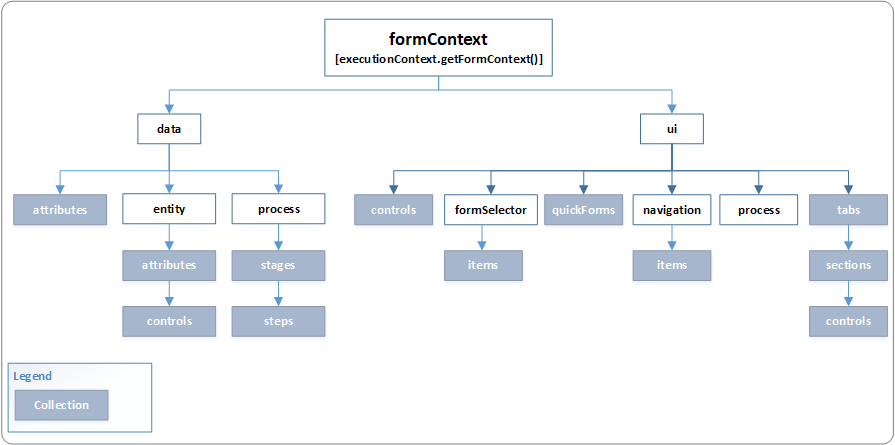
The Client API form context (formContext) provides a reference to the form or to an item on the form, such as, a quick view control or a row in an editable grid, against which the current code is executed.
Earlier, the global Xrm.Page object was used to represent a form or an item on the form. With Dynamics 365 (online), version 9.0, the Xrm.Page object is deprecated, and for you should use the getFormContext method of the passed in execution context object to return reference to the appropriate form or an item on the form.

Utilizing the formContext object rather than the Xrm.Page object

Please find the below sample code for example

Using Xrm.object
Function contactDetails()
{
         var fName = Xrm.Page.getAttribute("firstname").getValue();
    var lName = Xrm.Page.getAttribute("lastname").getValue();
}

Using formContext
function contactDetails(executionContext)
{
    var formContext = executionContext.getFormContext(); //to get the formContext

    // use formContext instead of Xrm.Page 
    var fName = formContext.getAttribute("firstname").getValue();
    var lName = formContext.getAttribute("lastname").getValue();
   
}

Dynamics 365 9.0- FormContext object model

formContext object model

Source:Dynamics 365

Sunday, 7 January 2018

List OF Replacement Client API-Dynamics 365

Source:Dynamics 365
Deprecated Client API Replacement Client API Comments
Xrm.Page Forms: ExecutionContext.getFormContext
Commands: Send it as the PrimaryControl parameter
Xrm.Page is the primary form context. If a script is run on a secondary context (grid row, quick form, related entity) then Xrm.Page will be for the wrong form context. By using alternate methods of getting the form context we allow the same script to be used without modification in all contexts.
Xrm.Page.context Xrm.Utility.getGlobalContext Allows access to the global context without going through the form context.
Xrm.Page.context.getQueryStringParameters formContext.data.attributes The formContext.data.attributes API will make retrieval of non-entity bound data consistent across entity forms, metadata-driven dialogs, and task-based flows. The data will be a combination of custom values sent using the query string and what was specified in the parameters in the openForm method.
Xrm.Page.context.getTimeZoneOffsetMinutes globalContext.userSettings.getTimeZoneOffsetMinutes Moved to globalContext.userSettings
Xrm.Page.context.getUserId globalContext.userSettings.userId Moved to globalContext.userSettings
Xrm.Page.context.getUserLcid globalContext.userSetings.languageId Moved to globalContext.userSettings
Xrm.Page.context.getUserName globalContext.userSettings.userName Moved to globalContext.userSettings
Xrm.Page.context.getUserRoles globalContext.userSettings.securityRoles Moved to globalContext.userSettings
Xrm.Page.context.getIsAutoSaveEnabled globalContext.organizationSettings.isAutoSaveEnabled Moved to globalContext.organizationSettings
Xrm.Page.context.getOrgLcid globalContext.organizationSettings.languageId Moved to globalContext.organizationSettings
Xrm.Page.context.getOrgUniqueName globalContext.organizationSettings.uniqueName Moved to globalContext.organizationSettings
Xrm.Page.data.entity.getDataXml No change in the method, but use "typename" instead of type for lookup attributes.
GridRow.getData GridRow.data GridRow is essentially a form context. This change unifies the interface of GridRow with formContext.
GridRowData.getEntity GridRowData.entity GridRowData is form data. This change unifies the interface of GridRowData with formContextData.
Xrm.Mobile.offline
parent.Xrm Earlier: An HTML web resource may interact with the Xrm.Page or Xrm.Utility objects within the form by using parent.Xrm.Page or parent.Xrm.Utility. Now: parent.Xrm.* will work if the HTML web resource is loaded in a form container. For other places, such as loading an HTML web resource as part of the SiteMap, parent.Xrm.* won’t work.
addOnKeyPress Use a custom control
removeOnKeyPress Use a custom control
showAutoComplete Use a custom control and corresponding UI
hideAutoComplete Use a custom control and corresponding UI
Xrm.Utility.alertDialog Xrm.Navigation.openAlertDialog The new signature is consistent with other APIs (openForm) and takes a new set of parameters for flexibility.
Xrm.Utility.confirmDialog Xrm.Navigation.openConfirmDialog The new signature is consistent with other APIs (openForm) and takes a new set of parameters for flexibility.
Xrm.Utility.isActivityType Xrm.Utility.getEntityMetadata The isActivityType method is synchronous so it was suitable for ribbon rules. However, the replacement method, getEntityMetadata, is asynchronous, and is not suitable for ribbon rules.
Xrm.Utility.openEntityForm Xrm.Navigation.openForm Moving navigation actions to Xrm.Navigation
Xrm.Utility.openQuickCreate Xrm.Navigation.openForm Moving navigation actions to Xrm.Navigation
Xrm.Utility.openWebResource Xrm.Navigation.openWebResource Moving navigation actions to Xrm.Navigation
Note: This API returns VOID in Unified Interface.

Thursday, 4 January 2018

Deprecated features Dynamics 365


Some of the Client APIs
Contracts, Contract Line Items and Contract Templates
Project Service Finder app
Parature Knowledgebase
Dialogs
Dynamics 365 for Outlook (Outlook Client)
Service Scheduling in Dynamics 365 for Customer Service
Standard SLAs in Dynamics 365 for Customer Service
Relationship Roles
Mail Merge
Announcements
EntityMetadata.IsInteractionCentricEnabled property
Silverlight (XAP) Web Resource


Source:Dynamics 365

Create an app in Dynamics 365 | Power Apps | Dynamics 365 Customer Engagement

  Prerequisites Make sure that you have the System Administrator or System Customizer security role or equivalent permissions. Create an app...